
Download DataToolbar – Web Data Extraction, Web Scraping, Data Collection, Data Harvesting
Overview
DataToolbar is a browser-based utility designed to simplify the process of web data extraction and web scraping for users across various industries. As a productivity-focused tool, it enables individuals and teams to collect structured data from online sources without requiring programming knowledge. The app is particularly valuable for professionals in market research, real estate, e-commerce, and competitive intelligence who need to gather large volumes of data from websites such as classifieds, price lists, real estate portals, and auction platforms.
By transforming catalog-style webpages into usable datasets, DataToolbar helps users convert unstructured web content into formats compatible with spreadsheets or databases. This functionality supports efficient data analysis, trend monitoring, and decision-making. The tool's purpose is to lower the technical barrier to data collection, empowering non-technical users to extract valuable information from complex websites with minimal effort.
Although the developer did not provide additional background details, DataToolbar has been available since 2012, indicating a long-standing presence in the data extraction space. Its continued relevance suggests a stable and reliable solution for users seeking straightforward web scraping capabilities. The app plays a meaningful role in the broader productivity ecosystem by enabling rapid data acquisition from diverse online sources.
Key Features & Functionality
- User-Friendly Interface: Designed for non-technical users, the interface allows setup and management of scraping tasks through simple mouse clicks. This ensures immediate usability for business users and analysts without prior coding experience.
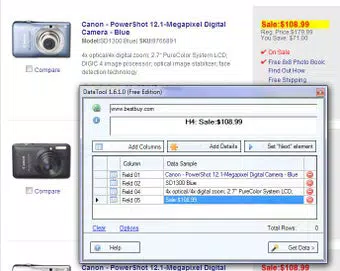
- Rapid Project Setup: With an integrated wizard, users can initiate scraping projects in seconds by selecting target data fields directly on the webpage. The automation reduces setup time and increases efficiency.
- Pattern Recognition Technology: The tool leverages advanced algorithms to detect and extract structured data across multiple pages. It can handle large datasets, including thousands of records and images, from both public and subscription-based websites.
- Versatile Data Sources: Capable of extracting data from real estate listings, classified ads, social media platforms, and price comparison sites, making it adaptable to multiple sectors and use cases.
- No Scripting Required: Eliminates the need for custom code or technical configuration. Users only need to point and click on desired data fields, significantly lowering the learning curve.
For example, a real estate analyst can use DataToolbar to collect property details from multiple listing sites in minutes, compiling them into a centralized spreadsheet. Similarly, a market researcher can monitor competitor pricing by extracting product information from e-commerce platforms without writing a single line of code.
Interface, UX & Performance
The interface of DataToolbar is designed around simplicity and direct interaction, prioritizing usability over complexity. Users interact with the browser environment through a streamlined toolbar that appears when navigating compatible webpages. Navigation is intuitive, relying on point-and-click actions to define data fields for extraction.
Visual design emphasizes clarity, with minimal distractions and clearly labeled controls. The workflow is linear: identify data → select fields → initiate extraction → export results. This consistent flow supports rapid task completion and reduces user errors.
Although the developer did not list formal performance metrics, the tool’s ability to process thousands of records suggests optimized backend handling. Performance across device categories is not specified, but the browser-based nature implies compatibility with standard desktop systems. Responsiveness appears to be efficient, as the tool functions within the browser without significant lag during data selection and export.
Stability is inferred from its long-standing release history, though no user-reported crash rates or update frequency were provided. Overall, the UX is tailored for efficiency and accessibility, aligning with its target audience of non-developers seeking quick data access.
Platform Compatibility & Technical Requirements
DataToolbar operates as a browser add-on, meaning it is designed to integrate directly into web browsers. The platform is listed as "Web Browser," indicating it is not a standalone mobile or desktop application but a runtime extension. The software version is 2.0.0, with a file size of 1.2 MB, suggesting a lightweight footprint.
Compatibility information was not fully disclosed. The developer did not specify minimum OS requirements or supported browser versions. As such, users should verify compatibility with their current browser environment before installation. The lack of detailed technical specifications limits precise assessment, but the small file size suggests minimal system impact.
Pros and Cons
Pros
- Intuitive interface suitable for non-technical users
- Fast project setup with no coding required
- Supports data extraction from diverse sources like real estate and classifieds
- Uses advanced pattern recognition for reliable data capture
- Lightweight file size (1.2 MB)
Cons
- Specific browser and OS compatibility not listed
- No information on update frequency or support lifecycle
- Developer background not disclosed
- Performance on older or low-end devices not confirmed
- Limited visibility into data export formats beyond general compatibility
FAQ
Is DataToolbar safe to install?
DataToolbar is a browser extension designed for data extraction. As with any third-party add-on, users should ensure they install it from official sources and review permissions. The tool does not require access to sensitive personal data, but it does interact with website content during scraping.
Can I use DataToolbar on mobile browsers?
The app is designed as a web browser add-on, and the developer did not specify mobile compatibility. It is primarily intended for desktop environments. Users should test functionality on mobile browsers, though it may not operate as expected.
Does DataToolbar require a subscription?
DataToolbar is sold as a one-time purchase at $19.95. There is no indication of recurring fees or subscription models. However, users should verify current pricing and licensing terms directly from the official source.
What types of websites can DataToolbar extract data from?
The tool is capable of extracting structured data from a wide range of websites, including real estate portals, classified ads, price lists, and online auction sites. It is optimized for catalog-style pages with repetitive data layouts.
How often can I update DataToolbar?
Update frequency was not disclosed by the developer. Users should check the official website or browser extension store for the latest version. The current version is 2.0.0, released in 2012.
Final Thoughts
DataToolbar stands out as a practical solution for individuals and teams needing to extract structured web data without technical expertise. Its focus on simplicity, rapid setup, and no-scripting requirements makes it accessible to a broad audience. While limited information on compatibility and updates is available, the tool’s core functionality remains relevant for data collection tasks across multiple industries.
For professionals in market research, e-commerce monitoring, or real estate analysis, DataToolbar offers a streamlined way to gather actionable insights from online sources. Its lightweight design and intuitive workflow ensure minimal disruption to existing workflows.
Despite its age, the tool continues to serve a niche but vital role in the data extraction landscape. For those seeking a straightforward, secure, and efficient way to collect web data, DataToolbar delivers real value.
Download DataToolbar now


